aCar - Car Management, Mileage
- 1.8
- Rating
- 1.00M
- Installs
- Free
- Price

 Analysis by App-foxy
I tend to notice a vehicle-management app most when I am standing beside a fuel pump, trying to remember the last time I changed the oil or wondering whether a recent drop in mileage is normal. That is the practical space where aCar makes sense. It is a free Android app from Fuelly, LLC, built for recording fill-ups, maintenance, trips, and vehicle expenses in one place rather than scattering those details across paper receipts, notes, and memory.
After using it as a personal logbook, I found its appeal less about flashy presentation and more about building a useful history over time. The app is aimed at people who want to understand what their vehicles cost and how they behave. It can suit a household with several cars, a driver trying to monitor fuel economy, or someone preparing to sell a vehicle and wanting a clearer maintenance record. It is available to everyone in the age-rating sense, and the free entry point makes it easy to try without committing money first.
The important question is not whether aCar can replace a mechanic, a navigation app, or a full accounting system. It cannot. The better question is whether keeping careful vehicle records is worth a little repeated data entry. In my experience, the answer is yes for an owner who wants trends and reminders in one dedicated place, but less so for someone who only wants to check fuel prices or receive automatic service notifications.
You May Also Like

 Blood Strike: 2.5 Anniversary
Blood Strike’s Loadouts Turn Every Drop Into a Tactical Gamble
A close look at Blood Strike’s custom loadouts: how fast access to signature weapons reshapes its battle royale rhythm, rewards preparation, and narrows the gap between fights.

 Pandora - Music & Podcasts
Pandora’s Music Is Easy to Start, but Harder to Recover
Pandora’s strength is its low-effort path from a seed to a station. Its weak spot is how much confidence it asks you to place in connection, setup, and quiet recovery.

 8 Ball Pool
 Is Built on Rivalries, Rematches, and Routine
A close look at the rivalries, rematches, shared routines, and unanswered safety questions that turn a quick pool match into a persistent mobile community.

 Samsung Music
’s Quiet Strength Is Playing What You Already Own
Its reach comes less from spectacle than from dependable access to a personal library. That simplicity is both the app’s strongest retention engine and its ceiling.

 AccuWeather: Weather Radar
AccuWeather Review: A Quick, Clear Forecast for Everyday Decisions
For everyday plans, the best forecast is the one you can understand quickly. AccuWeather makes rain timing, radar, and local conditions easy to act on, with a few trade-offs.

 Hill Climb Racing
Why Hill Climb Racing Still Turns Crashes Into One More Run
A tiny car, a bumpy hill and one more upgrade: Hill Climb Racing keeps resurfacing because its simple chaos makes every near-miss feel personal.
More From Our News Desk



How aCar feels during everyday use
I judge a vehicle log by what it helps me remember when the car needs attention, not by how many details it can collect. In everyday use, aCar’s value comes from turning small entries—fuel stops, repairs, and trips—into a history I can revisit. That makes the habit of recording information just as important as the app’s organization, which leads to a closer look at the choices users can make while keeping that history.
Quick enough for the moments that matter
The main speed expectation is straightforward: this is a record-keeping tool, so its most important actions should feel direct. Adding a fill-up, selecting a vehicle, and entering the amount are the kinds of tasks I want to finish before leaving the station. aCar is most useful when the process becomes a habit rather than a project. If recording a purchase takes too much thought, people naturally postpone it, and postponed entries weaken every later calculation.
I would not approach this app expecting the instant, highly automated experience of a modern banking or navigation product. Its value depends on the information I supply. That creates a trade-off: manual records can be more personal and flexible, but they also require discipline. The app can organize the history I create; it cannot make an incomplete log accurate.
A good routine is to enter the odometer reading while the vehicle is still at the pump, then add the fuel quantity and cost before driving away. I found this more reliable than trying to reconstruct the visit at home. For maintenance, I would record the work immediately after paying, when the invoice is still in hand. This small change in timing is more important than chasing perfect organization later.
The current release is version 5.6.12, and the stated minimum is Android 6.0. That gives the app a broad reach across older Android phones as well as newer devices. Still, compatibility is not the same as a modern feel. On an older phone, I would keep expectations sensible: the app is designed around managing records, not delivering demanding graphics or continuous background activity.
What happens when the log gets busy
The heavier moments are not likely to come from visual complexity. They come from the amount of history being managed and from the number of decisions made during entry. A driver with one car and occasional fill-ups has a simple workload. A family tracking several vehicles, fuel types, repairs, tire changes, trips, and business expenses creates a much denser record.
That is where a dedicated vehicle log has an advantage over a basic notes app. Notes can store a receipt photo or a sentence, but they do not naturally turn repeated entries into a coherent ownership history. aCar gives the records a vehicle-centered context, which makes it easier to think in terms of “this car’s fuel use” or “that car’s maintenance” instead of searching through unrelated notes.
There is also a hidden cost to detailed tracking: every extra field is another opportunity to stop the workflow. I recommend beginning with the information that will genuinely change a decision, such as odometer reading, fuel amount, total cost, and maintenance work. Once that routine is stable, add trip or expense details. Starting with every possible category can make the app feel heavier than it needs to be.
For someone who drives for work, the trip and expense sections can be more valuable than the mileage figure alone. A self-employed driver may want to separate personal use from work-related journeys, while a family may care more about comparing running costs between vehicles. The useful insight is that the same app can serve both purposes, but only if the categories are used consistently. Mixing personal and business entries without a clear rule will make the eventual totals harder to interpret.
Reliability depends on the quality of the history
I see aCar’s reliability in two layers. The first is whether the app remains usable as a regular logbook. The second is whether the conclusions drawn from the records are trustworthy. The second layer is where the owner’s habits matter most. A missing odometer reading, an estimated fuel amount, or a maintenance entry added weeks late can distort the story even if the app itself behaves perfectly.
For that reason, I would treat the app as a structured memory aid, not as an automatic diagnostic instrument. If mileage suddenly looks worse, that is a reason to inspect tire pressure, driving conditions, fuel quality, load, and mechanical issues—not proof that the vehicle has a particular fault. The app can reveal a pattern worth investigating, but it should not replace professional advice.
One practical workflow is to use the maintenance record as a service timeline rather than a place to write vague comments. Instead of entering only “service,” I would note the actual work performed and the odometer reading. That makes the history useful when a garage asks what was done previously, and it helps prevent duplicate work. This is especially helpful when more than one person drives or maintains the same vehicle.
Another useful habit is to keep the vehicle identity and units consistent from the first entry. If records are entered with changing conventions, later comparisons become less meaningful. A clean beginning is easier than correcting a long history. I would also review entries after the first few fill-ups, because early mistakes in the odometer or fuel fields can affect the interpretation of later mileage trends.
Recovery when real life interrupts the routine
No tracking app can eliminate the common problem of forgetting to log a fuel stop. The best recovery approach is to enter the missed transaction as soon as possible using the receipt, payment record, or vehicle odometer. If the exact odometer reading is unavailable, I would rather mark the entry as approximate in my own notes than pretend the number is exact. Honest uncertainty is more useful than false precision when reviewing a long-term pattern.
The same principle applies after a repair. If a garage visit includes several jobs, recording them as one vague event may save time initially, but separating the work gives the history more value later. It can show whether a recurring cost is tied to routine servicing, tires, parts, or an unexpected repair. That distinction matters when deciding whether to keep a vehicle or compare it with another option.
I would also avoid deleting an old entry simply because it looks unusual. A single expensive repair or an unusually low mileage result may be exactly the information needed to explain a later change. Correct obvious typing errors, but preserve genuine exceptions. Vehicle ownership is not a smooth graph, and a useful log should reflect that.
Older phones and everyday resource demands
Because aCar is focused on text, numbers, and vehicle records rather than intensive media, its resource demands should be modest compared with apps built around video, mapping, or constant live updates. That makes it a reasonable candidate for a secondary or older Android phone used in the car. The minimum operating-system requirement of Android 6.0 is also helpful for people who do not replace their phone frequently.
That said, an older device can still make any data-entry task feel slower or less comfortable, especially if the screen is small or the phone has limited free storage. The practical constraint is not just processing power. It is whether entering a reading is comfortable enough that I will actually do it every time. A fast app that is awkward to use at a fuel station still fails its main purpose.
I would not choose aCar solely because it is light on resources if my priority is automatic tracking. The app’s core strength is organized manual information, while some alternatives focus on connected vehicle data, automatic trip detection, or service alerts. Those alternatives may reduce typing, but they can also be less flexible for older vehicles or for owners who want to record expenses in their own way.
The free price is a sensible reason to test the workflow before making it part of a long-term routine. Optional in-app purchases range from $0.99 to $14.99 per item, so I would check what is included in the free experience and decide whether any paid option solves a real problem for me. I would not pay simply because I have accumulated a history; I would pay only if the additional capability clearly improves the way I manage my vehicles.
Where it beats familiar alternatives
The usual alternative is a phone note, spreadsheet, or paper folder. Paper is easy to start but difficult to search and compare. Notes are flexible but tend to become inconsistent. A spreadsheet can be powerful, yet it requires more setup and is less pleasant to use beside a fuel pump. aCar occupies a useful middle ground: more structured than notes, less technical than building a spreadsheet from scratch.
Compared with a fuel-price app, its purpose is different. A fuel-price tool helps me decide where to buy fuel today; aCar helps me understand what my own vehicle has cost over time. Compared with a mechanic’s service reminder, it offers a broader ownership record rather than focusing only on scheduled work. Compared with automatic telematics, it may involve more manual effort, but it can remain useful for vehicles without connected systems and for expenses that a vehicle sensor cannot see.
That comparison also reveals when I would skip it. If I want hands-off tracking, live location, automatic diagnostics, or a polished route history, I would look elsewhere. If I own a vehicle only briefly and do not care about long-term costs, the setup may not repay the effort. And if I already maintain a detailed spreadsheet that I review regularly, moving to another system could create duplicate work rather than simplify anything.
A realistic ownership example
Imagine a household with an older commuter car and a newer weekend vehicle. The commuter is filled more often, while the second car receives fewer but sometimes larger maintenance expenses. With aCar, I would create a separate record for each vehicle, enter every fill-up with the odometer, and log repairs under the car that received them. After several weeks, the value would not be a single impressive number; it would be the ability to see which vehicle is actually costing more to operate and why.
That distinction can change a decision. The commuter may use more fuel but have predictable maintenance, while the weekend car may appear economical until insurance-related or repair expenses are included in the owner’s broader records. A simple fuel-only comparison could lead to the wrong conclusion. Including trips and expenses produces a more realistic picture of ownership, provided the entries follow the same rules.
For a used-car buyer, I would use the app after purchase rather than expect it to verify the seller’s claims. The first entry establishes my own baseline. From there, repeated mileage and maintenance records can help me notice changes. It will not replace an inspection or service history, but it can prevent my own records from disappearing into a drawer of receipts.
My performance verdict
After looking at speed, busy periods, reliability, and device constraints together, I see aCar as a practical long-term utility rather than an exciting app. Its performance is tied to a simple loop: open it, record the event, and return later to understand the pattern. That loop is easy to explain, but its usefulness grows only when I maintain it consistently.
The broad installation base—over a million installs—shows that the concept has reached many Android users, while the average rating of 1.7 from around twenty-one thousand ratings suggests that the experience has not satisfied everyone. I would take that low rating seriously, especially if I expect a highly polished or automated product. At the same time, ratings do not change the central trade-off: people who want a dedicated manual vehicle log may value it differently from people expecting effortless tracking.
My recommendation is specific. Try it if you want to track fuel mileage, maintenance, trips, and expenses across one or more vehicles and you are willing to enter information yourself. Use a consistent routine, start with essential fields, and review unusual results instead of treating them as diagnoses. It is particularly suitable for older cars, households comparing running costs, and owners who want a searchable history without designing a spreadsheet.
I would pass on it if automatic data collection is non-negotiable, if you need navigation or live vehicle information, or if you know you will rarely record fill-ups. In those cases, a different category of tool will fit better. For everyone else, aCar is strongest when treated as a dependable ownership journal, not a magic dashboard. Its free starting point makes experimentation easy, and its real payoff comes from the decisions that a well-kept record helps me make later.
FAQs for aCar - Car Management, Mileage
01What features does aCar offer for vehicle management?
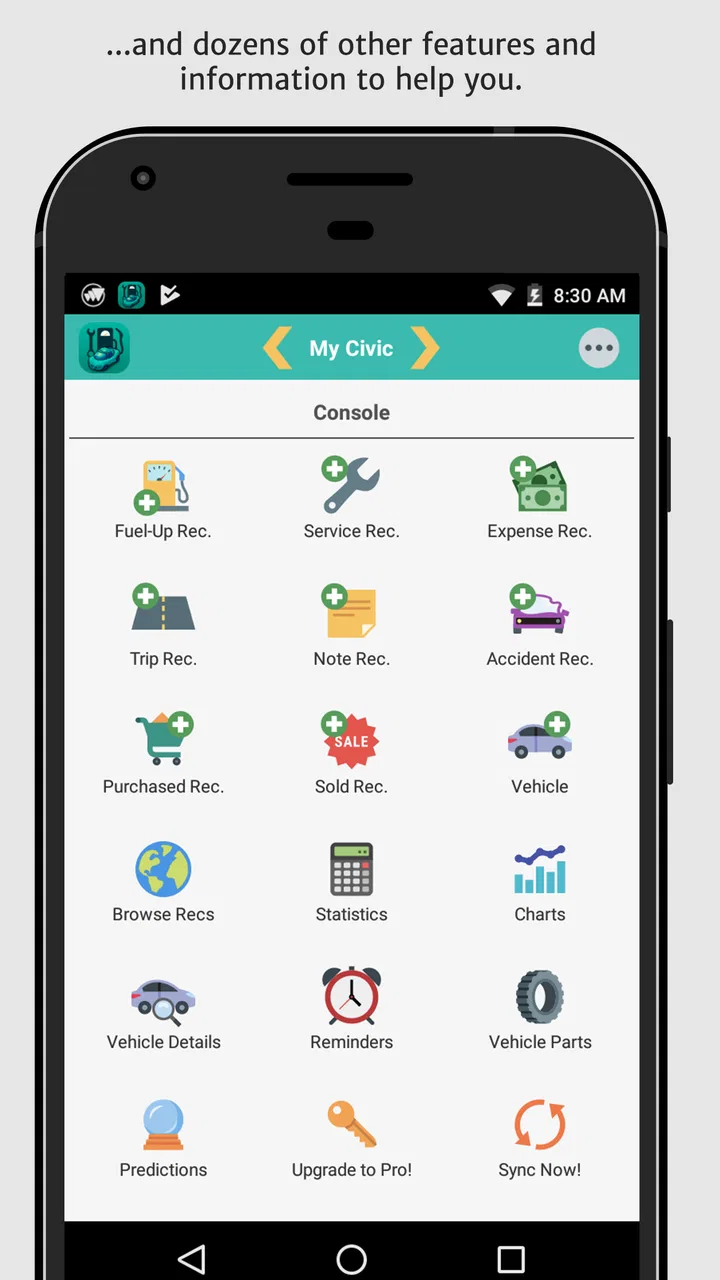
aCar provides a comprehensive suite of features for managing your vehicle. It includes tracking fuel mileage, maintenance schedules, expenses, and trip logs. You can also set reminders for oil changes and other routine services. The app supports multiple vehicles, making it ideal for families or small businesses with several cars.
02Is aCar compatible with both Android and iOS devices?
Currently, aCar is primarily available for Android devices. While iOS users might seek alternatives, the Android version is robust and offers extensive features for vehicle management. Always check the app store for any updates regarding iOS compatibility or similar applications.
03How user-friendly is the aCar interface for new users?
aCar boasts an intuitive interface that is easy to navigate, even for beginners. The app uses straightforward menus and provides clear instructions for inputting data. Users appreciate its organized layout, which simplifies tracking and reviewing vehicle-related information efficiently.
04Can aCar handle data for multiple vehicles?
Yes, aCar is designed to manage information for multiple vehicles. This feature is particularly useful for users with more than one car or small businesses managing a fleet. Each vehicle can have its own set of data, including maintenance records and fuel logs, all accessible from the same account.
05Does aCar offer data backup options?
aCar provides data backup options to ensure your information is secure. Users can backup their data to local storage or cloud services, protecting against data loss. This feature is crucial for maintaining a consistent record of your vehicle's history and ensuring easy data transfer when changing devices.
Pros
- User-friendly interface
- easy navigation.
- Comprehensive fuel tracking features.
- Customizable service reminders.
- Expense reports with detailed analytics.
- Supports multiple vehicles.
Cons
- Limited free version features.
- No cloud sync in basic version.
- Ads can be intrusive.
- Occasional data sync issues.
- No integration with other apps.

aCar - Car Management, Mileage
Gallery